
Assign an Opportunity to a Salesperson
A recorded and qualified opportunity needs to be assigned it to the appropriate salesperson for action. Assigning opportunities ensures clear ownership, accountability, and follow-through throughout the sales process. By designating a salesperson, an organization can efficiently manage prospect communications, track progress, and maintain visibility into the opportunity pipeline. This step helps ensure that every opportunity is actively managed by the right team member from initial engagement through project award.
✅ Goal
Assign ownership of an opportunity to a salesperson responsible for managing customer interactions, follow-up activities, and opportunity progression.
📍 When to Use This
Assign an opportunity immediately after creation or whenever responsibility for the opportunity changes.
🚶➡️ Step-By-Step Guide
📋 Procedure
1. Navigate to Opportunities

2. Select an existing opportunity

3. Click Assign

4.
● Choose to Assign to Me / User or Team
● Select User or Team
● Click Assign

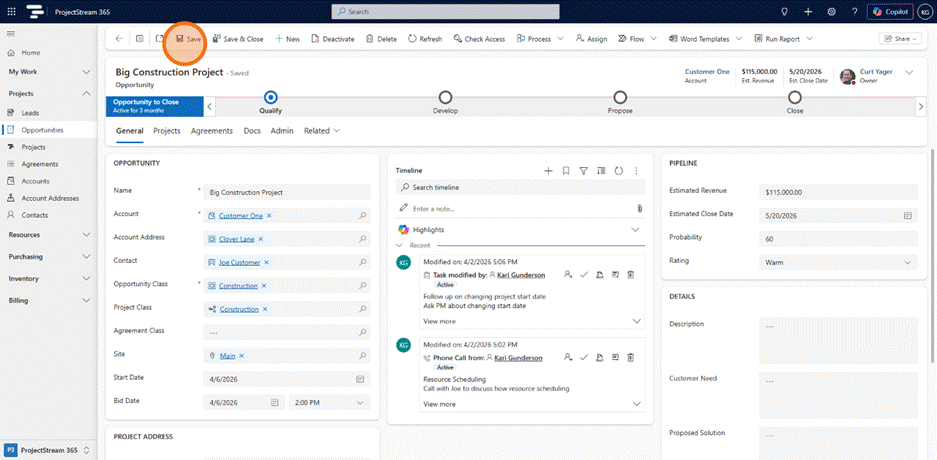
5. Click Save
💡 Tips
- Assign opportunities as soon as they are created to ensure timely follow-up.
- Match opportunities to salespeople based on territory, market segment, expertise, or customer relationships.
- Reassign opportunities promptly when ownership changes to maintain accountability.
- Avoid assigning opportunities to multiple owners unless a clear ownership strategy is defined.
- Review unassigned opportunities regularly to prevent potential business from being overlooked.
✅ Result
The selected salesperson becomes the owner of the opportunity and is accountable for advancing it through the sales pipeline.
🔗 Related Actions
🧭 What Happens Next?
The assigned salesperson begins working the opportunity, recording activities and advancing sales stages.