
Enter Opportunity Timeline Activities
✅ Goal
Record communications, meetings, follow-ups, tasks, and other interactions related to an opportunity to maintain a complete history of customer engagement.
📍 When to Use This
Add timeline activities whenever interactions occur that impact the sales process, customer relationship, or opportunity status.
🚶➡️ Step-By-Step Guide
📋 Procedure
1. Navigate to Opportunities
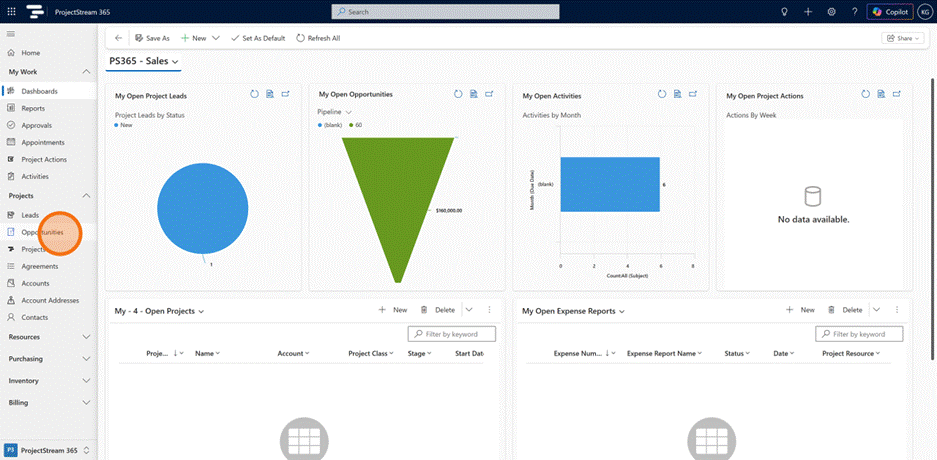
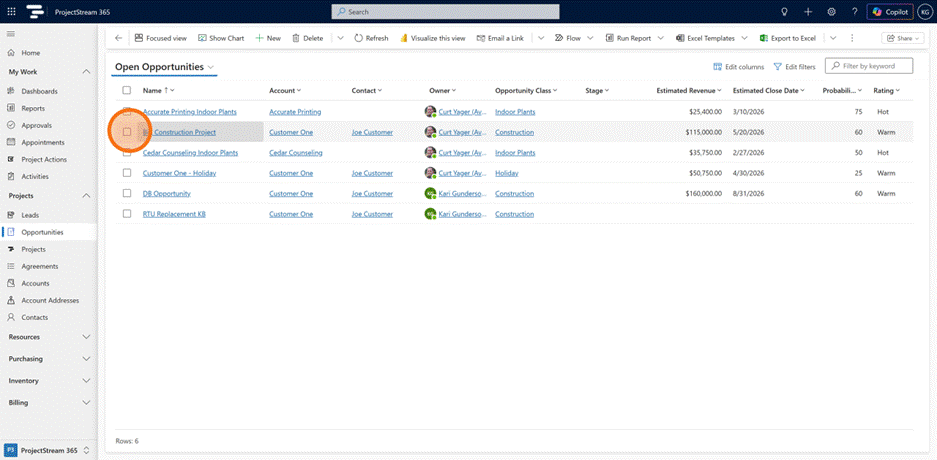
2. Open an existing opportunity.
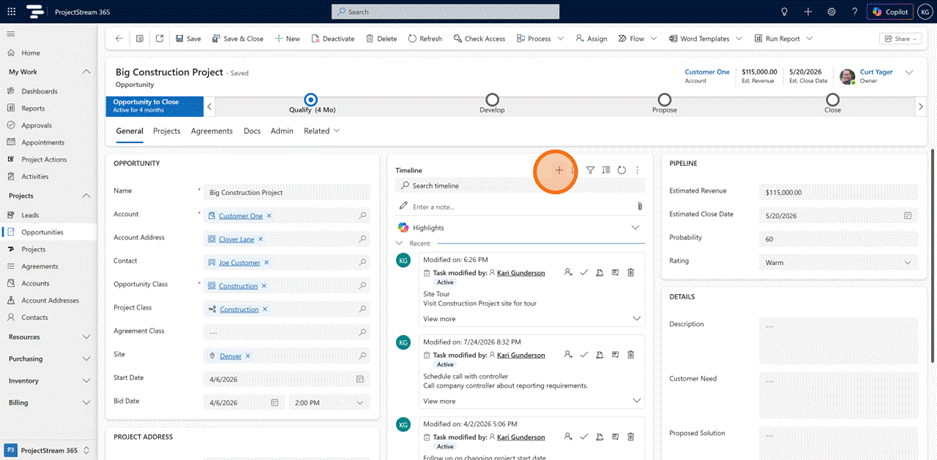
3. Click the + button to add a new activity.
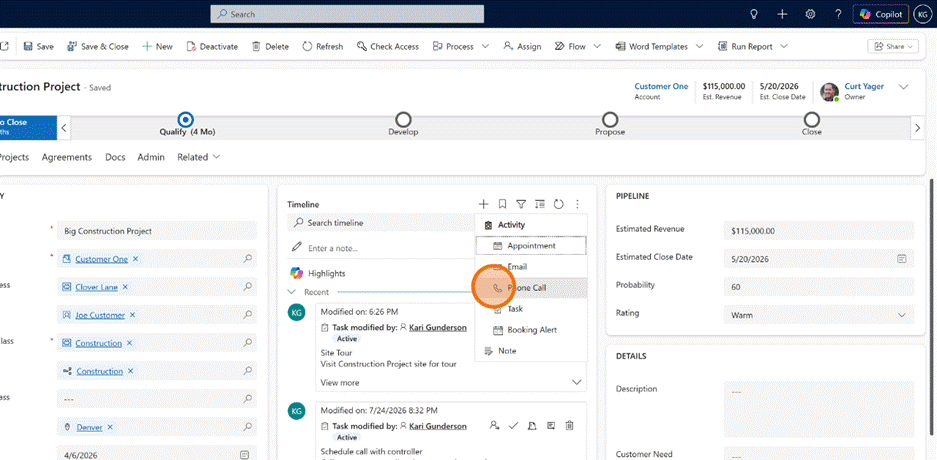
4. Select the activity type to record this touchpoint accurately.
5. Enter the activity details and click Save to log the activity on the timeline.
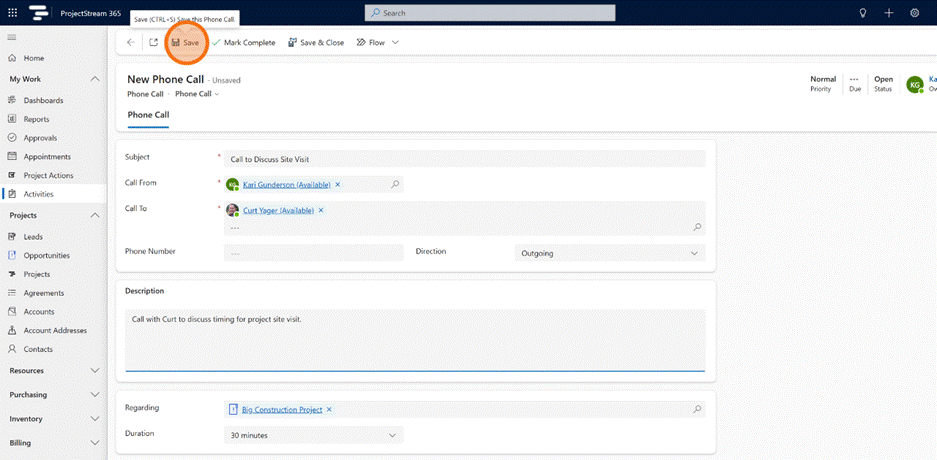
Activity type: Phone Call
| Field | Description |
|---|---|
| Subject | The name or topic of the phone call activity. The subject provides a concise summary of the purpose of the conversation and serves as the primary identifier for the activity in the timeline. |
| Call From | The person or user who initiated the phone call. This field identifies the originator of the communication and is used for activity ownership and tracking. |
| Call To | The person or contact who received the phone call. This field identifies the intended recipient of the communication. |
| Phone Number | The telephone number associated with the call recipient. The phone number provides a direct communication reference for the activity. |
| Direction | Indicates whether the phone call was incoming or outgoing. Direction helps distinguish between calls initiated by internal users and calls received from prospects or customers. |
| Description | Detailed notes and information captured during or after the phone call. The description typically contains discussion topics, customer requirements, questions, decisions, commitments, and follow-up details. |
| Regarding | The ProjectStream 365 record associated with the phone call activity. This relationship links the communication to a lead, opportunity, proposal, agreement, account, or other business record, allowing the activity to appear in the related timeline. |
| Duration | The planned or actual length of the phone call. Duration supports activity tracking, reporting, and workload analysis. |
Activity Type: Booking
| Field | Description |
|---|---|
| Subject | The name or summary of the booking activity. The subject provides a concise description of the task or action being tracked and serves as the primary identifier for the booking record. |
| Owner | The user responsible for managing and maintaining the booking activity. The owner is typically the salesperson or team member accountable for ensuring the activity is completed. |
| Description | Detailed information related to the booking activity. The description typically contains task requirements, customer requests, activity objectives, follow-up details, and other supporting information. |
| Regarding | The ProjectStream 365 record associated with the booking activity. This relationship links the activity to a lead, opportunity, proposal, agreement, account, or other business record, allowing the activity to appear in the related timeline. |
| Priority | The relative importance of the activity. Priority helps users distinguish between low, normal, and high-priority tasks when managing workload and follow-up activities. |
| Due Date | The target completion date for the activity. The due date is used for scheduling, task management, reminders, and activity reporting. |
| Assignees | The users, resources, or team members responsible for performing or participating in the activity. Multiple assignees can be associated with a booking activity when collaboration is required. |
Activity Type: Customer Voice Alert
| Field | Description |
|---|---|
| Subject | The name or summary of the Customer Voice Alert. The subject serves as the primary identifier for the feedback record and typically reflects the survey response or customer issue being tracked. |
| Owner | The user responsible for managing, reviewing, and resolving the Customer Voice Alert. The owner maintains accountability for follow-up and resolution activities. |
| Regarding | The ProjectStream 365 record associated with the feedback. This relationship connects the alert to a lead, opportunity, proposal, agreement, account, project, or other business record. |
| Assignee Email | The email address of the individual assigned to review or resolve the survey feedback. |
| Assignee Name | The name of the individual assigned responsibility for evaluating or responding to the customer feedback. |
| Customer Name | The name of the survey respondent or customer providing the feedback. |
| Customer Email | The email address of the customer who submitted the survey response. |
| Date Created | The date and time the Customer Voice Alert was generated in the system. |
| Notes | Additional comments, observations, or information related to the customer feedback and resolution process. |
| Project | The project associated with the survey response or feedback submission. This relationship allows customer feedback to be linked directly to a specific project record. |
| Questions | The survey question or questions associated with the response that triggered the alert. |
| Reason | The reason identified for the customer feedback, issue, concern, or satisfaction rating. |
| Resolution Detail | Detailed information describing the actions taken to address customer feedback or resolve identified concerns. |
| Resolution Sentiment | The sentiment classification associated with the resolution outcome, providing insight into customer perception following resolution activities. |
| Resolver Email | The email address of the individual who resolved or closed the feedback item. |
| Resolver Name | The name of the individual responsible for resolving the customer feedback or completing the required follow-up actions. |
| Satisfaction Metric | The satisfaction measurement associated with the survey response, such as rating, score, Net Promoter Score (NPS), Customer Satisfaction Score (CSAT), or another survey metric. |
| Survey | The Customer Voice survey from which the feedback was collected. |
| Survey Response | The specific survey response record associated with the alert. This relationship provides access to the original customer feedback data. |
| To | The recipient or recipients associated with the survey communication or alert notification. |
| Last Updated | The date and time the Customer Voice Alert was last modified, updated, or closed. |
Activity Type: Outbound Message
| Field | Description |
|---|---|
| Subject | The name or summary of the outbound message. The subject serves as the primary identifier for the communication record and provides context regarding the purpose or content of the message. |
| Owner | The user responsible for creating, managing, or initiating the outbound message. The owner maintains accountability for the communication activity and its associated follow-up actions. |
| Regarding | The ProjectStream 365 record associated with the outbound message. This relationship links the communication to a lead, opportunity, proposal, agreement, account, project, or other business record, allowing the activity to appear in the related timeline. |
| Channel Type | The communication channel used to deliver the message. The channel type identifies the messaging platform or delivery method used for customer communication, such as email, SMS, chat, or other supported channels. |
| Message Text | The content of the outbound communication. Message Text stores the body of the message that was sent to the recipient and provides a historical record of the communication. |
Activity Type: Session
| Field | Description |
|---|---|
| Subject | The name or summary of the session activity. The subject serves as the primary identifier for the session and typically reflects the purpose, topic, or nature of the customer interaction. |
| Owner | The user responsible for managing the session record. The owner maintains accountability for reviewing, monitoring, and maintaining the session activity. |
| Conversation | The conversation associated with the session. This field identifies the communication thread, chat interaction, or engagement record that generated the session. |
| Channel | The communication channel through which the interaction occurred. The channel identifies the source of the session, such as chat, messaging, social media, web engagement, or another supported communication method. |
| Session Created On | The date and time the session was created. This timestamp marks the beginning of the customer interaction and is used for activity tracking and reporting. |
| Session Closed On | The date and time the session was completed or closed. This timestamp indicates when the interaction concluded. |
| Agent Assigned On | The date and time responsibility for the session was assigned to an agent or user. This value supports workload management and response time analysis. |
| Agent Accepted On | The date and time the assigned agent accepted responsibility for the session. This timestamp provides visibility into assignment acknowledgement and response performance. |
| Regarding | The ProjectStream 365 record associated with the session. This relationship links the activity to a lead, opportunity, proposal, agreement, account, project, or other business record, allowing the session to appear in the related timeline. |
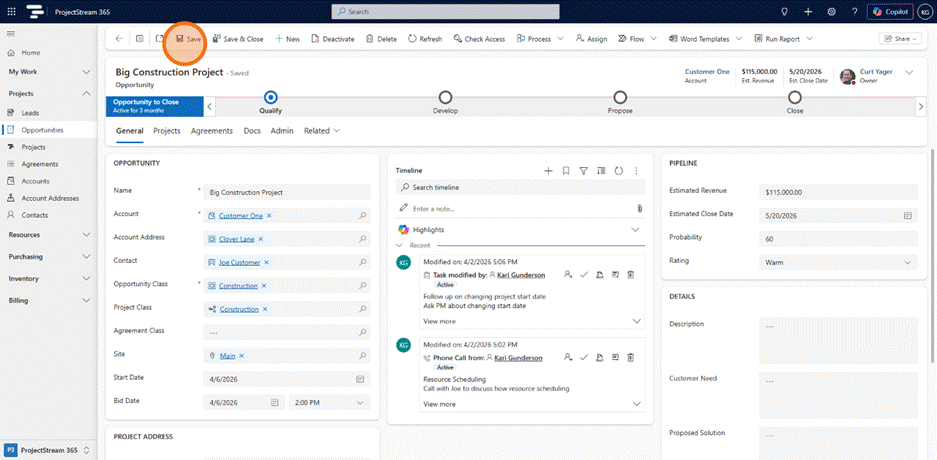
- Click Save
💡 Tips
- Record activities immediately after customer meetings, calls, or emails while details are fresh.
- Include concise notes that summarize key discussion points and next steps.
- Schedule follow-up activities to ensure commitments are not missed.
- Keep timeline entries professional and focused on business-related information.
- Use timeline activities to create a complete history of customer engagement for future reference.
✅ Result
A complete activity history is maintained, providing visibility into customer interactions and supporting effective opportunity management.
🔗 Related Actions
- ➡ Track Opportunity Stages and Steps
- ➡Enter Opportunity Timeline Activities
- ➡ Close Opportunity as Won
- ➡ Close Opportunity as Lost
🧭 What Happens Next?
Review activity outcomes and update opportunity stages as progress is made.